Why Does Most Amazon India Listing Advice Not Work?
Most SEO advice for Amazon listings is generic: add keywords to your title, write good bullet points, get more reviews. Sellers follow this advice and still end up on page 3 wondering what went wrong.
Generic advice does not diagnose the actual problem. The 7 reasons a listing fails to rank are each different, each checkable, and each with a specific fix. Work through each in order and stop when you find yours.
📌 How to Use This Guide
Each reason includes what the problem is, how to check for it, and how to fix it. Newer listings should start at Reason 1 and Reason 6. Listings that previously ranked and then dropped should start at Reason 3 and Reason 4.
What Are the 7 Reasons Your Amazon India Listing Is Not Ranking?
01
Your Listing Is Not Indexed for the Target Keyword
If Amazon has not indexed your listing for a keyword, you cannot rank for it. Period. You could have the best title, the best price, and the most reviews in the category. You will still be invisible on that term.
HOW TO CHECK
Type your ASIN followed by the keyword into the Amazon India search bar, for example B09XY7ABC earphone. If your listing appears, you are indexed for that term. If it does not appear, add it to your backend search terms.
THE FIX
Add the keyword to your backend search terms field in Seller Central (Edit Listing, Keywords tab). Amazon re-indexes listings within 24 to 48 hours of a backend keyword save. If the keyword is a high priority one, also add it naturally to a bullet point or the product description for stronger indexing weight.
02
Poor Click Through Rate from Search Results
Amazon measures whether buyers click your listing when they see it in search results. If your click through rate is low compared to competitors on the same keyword, Amazon gradually moves you down and promotes listings that get more clicks. This is one of the most underexplained ranking signals for Indian sellers.
HOW TO CHECK
Search your main keyword on Amazon India and compare your listing against the top 5 results. If your main image is weaker or your price is noticeably higher than the top results, click through rate is likely dragging your rank down.
THE FIX
Replace your main image with a white background shot where the product fills at least 85% of the frame. Rewrite your title so the first 60 characters contain the most important keyword and the clearest product description. If your price is significantly higher than the top results, check whether a small reduction pays off in rank improvement.
03
Low Conversion Rate Is Signalling Low Relevance
Amazon's A9 algorithm treats conversion rate as evidence that your listing is relevant to a keyword. When buyers search a term, find your listing, and do not buy, Amazon reads this as a signal that your product is not what they were looking for on that term. Over time, your rank falls even if your listing was previously well placed.
HOW TO CHECK
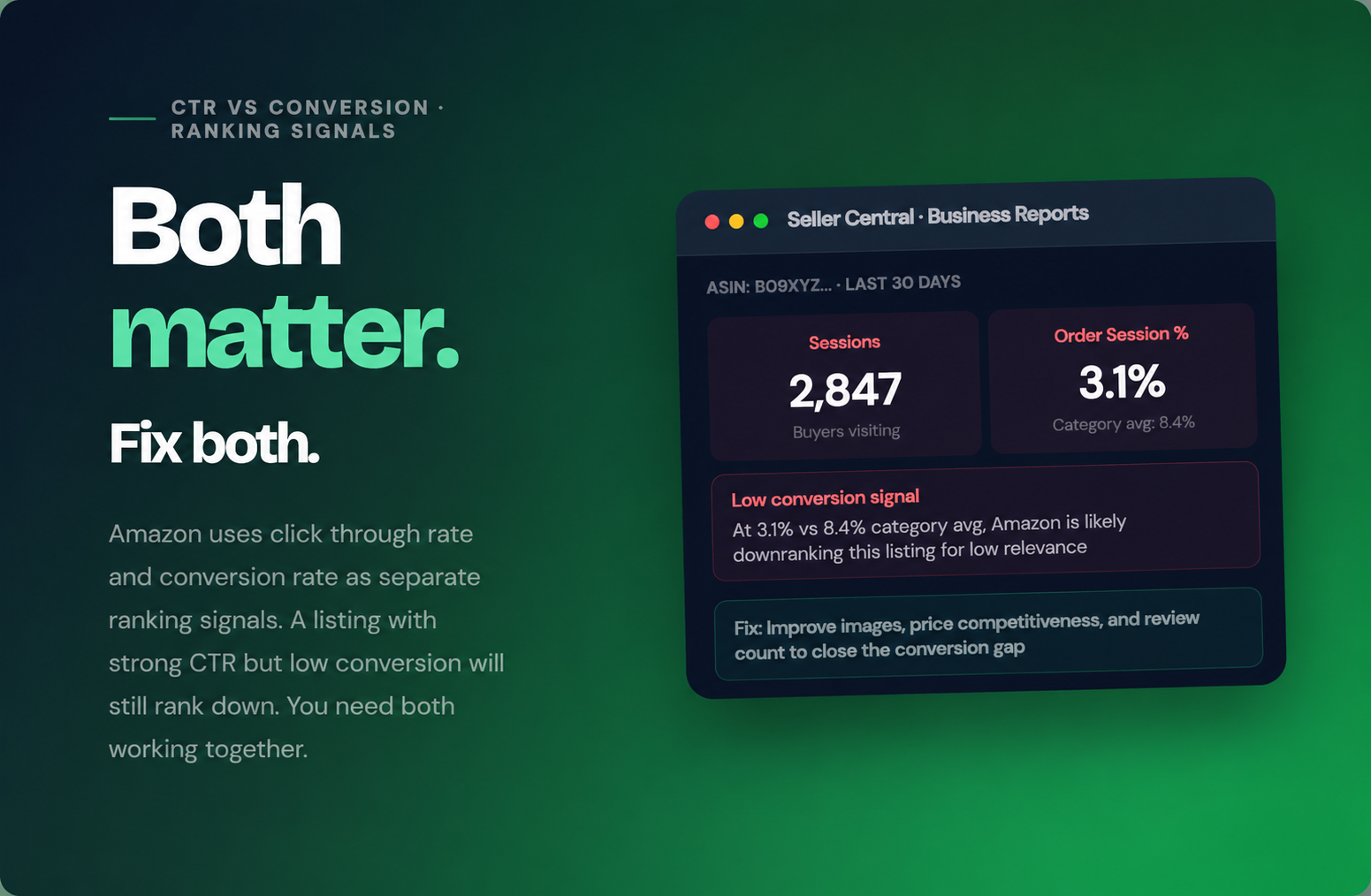
In Seller Central, go to Reports then Business Reports then Detail Page Sales and Traffic by ASIN. If your Order Session Percentage is below 6% for a mid range product, conversion is likely dragging your rank down. Compare to your category benchmark via Brand Analytics if you have access.
THE FIX
The fastest conversion rate improvements come from three things: adding more product images (lifestyle and infographic shots, not just white background), increasing your review count through Amazon Vine or follow-up messaging, and ensuring your price is within 10 to 15% of the top competitor. Address whichever of these three is weakest first.
04
Your Listing Is Suppressed and You Do Not Know It
A suppressed listing does not appear in search results at all. Amazon suppresses listings for pricing policy violations, missing mandatory attributes, image guideline breaches, and compliance flags. The listing is still visible in Seller Central as active, which is why many sellers do not notice it for days or weeks.
HOW TO CHECK
In Seller Central, go to Inventory then Manage Inventory and look for yellow or red warning icons next to the ASIN. A yellow icon means a listing quality issue; red means the listing may be suppressed. Also search your product title in a private browser window on Amazon India to confirm.
THE FIX
Click the warning icon to read the specific suppression reason. The three most common causes for Indian sellers are: price set too high compared to your own price history on Amazon, a missing mandatory attribute in the product detail fields, and a main image that does not meet the white background requirement. Fix the flagged issue and the listing re-indexes within 24 to 72 hours.
05
Backend Keywords Are Empty, Duplicated, or Stuffed
The backend search terms field in Seller Central gives you 250 bytes of invisible keyword real estate. Amazon indexes these terms and uses them to determine what searches your listing is relevant for. Most Indian sellers either leave this field nearly empty, repeat keywords that are already in their title, or fill it with irrelevant terms hoping for extra traffic.
HOW TO CHECK
Open Edit Listing in Seller Central and check the Search Terms field under the Keywords tab. Under 150 bytes means you are missing indexing opportunities. Words already in your title waste those bytes.
THE FIX
Fill the backend field to near 250 bytes using keywords not already in your title or bullets, including Hindi transliterations, common misspellings, and buying intent terms. No punctuation, no repeated words. Save and wait 24 to 48 hours.
06
Insufficient Sales Velocity on the Target Keyword
Amazon's algorithm promotes listings that generate sales on a specific keyword. If you have never made a sale through a particular search term, Amazon has no evidence that your listing is relevant to it, regardless of whether the keyword appears in your copy. This particularly affects new listings and listings that have been relaunched after a long period of inactivity.
HOW TO CHECK
If your listing is less than 8 weeks old, or if you have not made a sale through Sponsored Products on your target keyword, sales velocity is likely the limiting factor. Look at your Sponsored Products search term reports to see which keywords have generated at least one sale. Those are the terms Amazon is starting to index you for organically.
THE FIX
Run an exact match Sponsored Products campaign on your 3 to 5 most important keywords for 7 to 10 days with a competitive bid. Even 3 to 5 sales per keyword through Sponsored Products gives Amazon enough signal to begin ranking your listing organically for that term. This is the fastest legitimate path from no rank to page 1 for a new listing.
07
Wrong Category Mapping Reducing Visibility in Filtered Search
When buyers use category filters on Amazon India, clicking into a specific department or subcategory, your listing only appears if it is mapped to that category. A product mapped to a parent category instead of the most specific relevant subcategory misses all filtered search traffic, which is often where the highest converting buyers are.
HOW TO CHECK
Go to your listing on Amazon India and find the Best Sellers Rank line in the Product Details section. It should show a specific subcategory like "Wired Headphones", not just "Electronics". If it shows only a broad parent category, your Browse Node is too generic.
THE FIX
Go to Edit Listing and select the most specific subcategory that accurately describes your product. If you cannot change the Browse Node yourself, raise a case with Amazon Seller Support providing the correct category path. Correct mapping typically improves filtered search visibility within 48 to 72 hours.
Seller Central Business Reports showing 3.1% Order Session Percentage against a category average of 8.4%. This conversion gap is a direct ranking signal Amazon uses to decide how prominently to show this listing.
Which Reason Should You Check First?
Not all 7 reasons are equally likely depending on your listing's situation. Here is the order to check them based on how old your listing is and what has changed recently.
| LISTING SITUATION | CHECK FIRST | THEN CHECK | LIKELY ROOT CAUSE |
|---|
| New listing, never ranked | Reason 1
(indexing) | Reason 6
(velocity) | No sales history |
| Previously ranked, now dropped | Reason 4
(suppression) | Reason 3
(conversion) | Algo signal change |
| Ranked on some keywords,
not others | Reason 1
(indexing) | Reason 5
(backend) | Keyword gap |
| Good traffic, few sales | Reason 3
(conversion) | Reason 2
(CTR) | Listing quality |
| Invisible in category browse | Reason 7
(category) | Reason 4
(suppression) | Wrong mapping |
| Ranking fell after listing edit | Reason 4
(suppression) | Reason 1
(indexing) | Edit triggered issue |
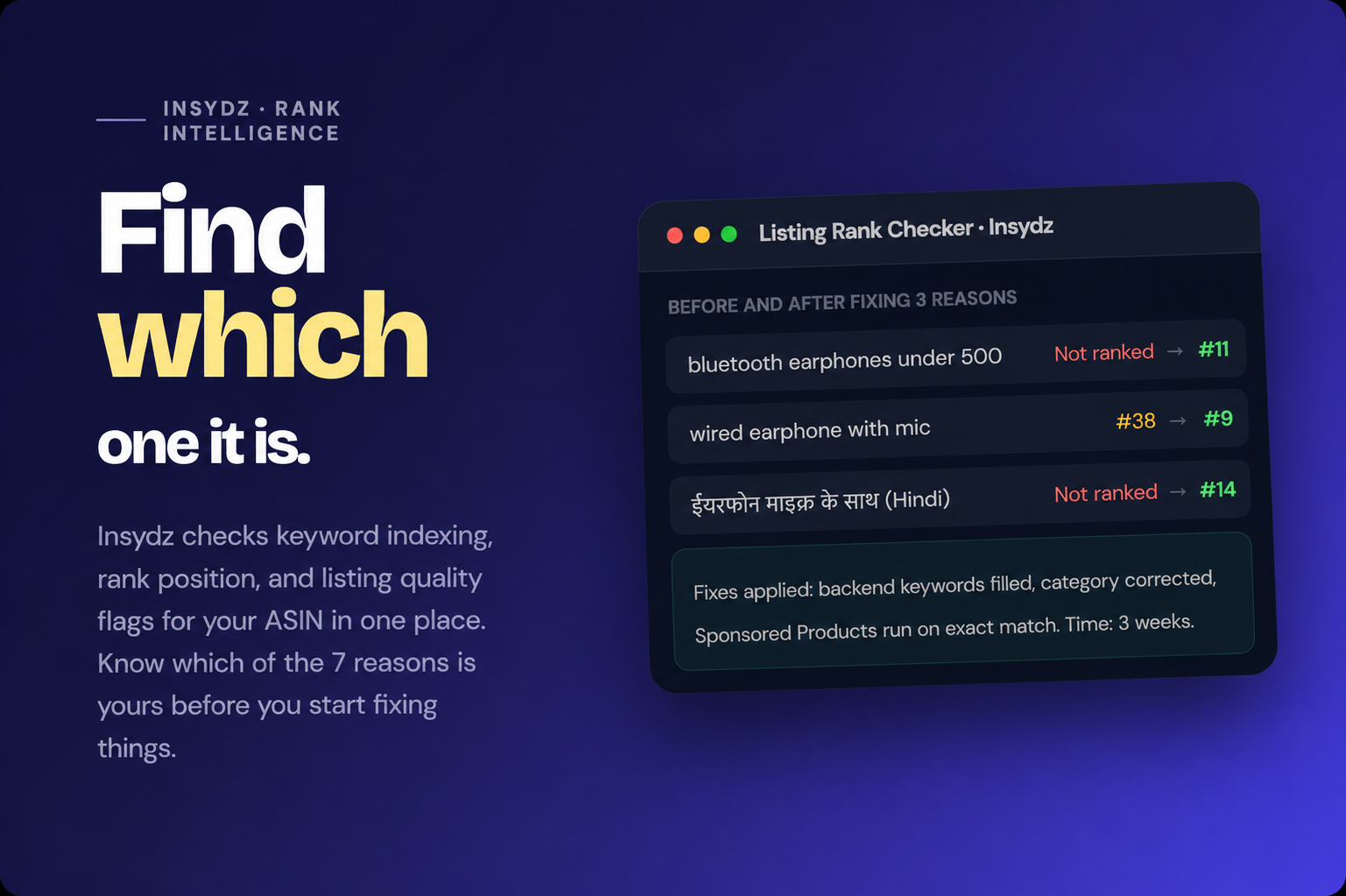
Insydz rank tracking showing movement after fixing 3 of the 7 reasons on a real earphones listing. Three weeks after fixing backend keywords, category mapping, and running exact match Sponsored Products, the listing moved from not ranked to page 1 on two terms.
What Does a Properly Optimised Amazon India Listing Look Like?
After fixing the relevant reason from the list above, use this benchmark to check your listing is fully optimised so the same problem does not return.
Title and Bullets
Title first 80 characters contain primary keyword and clearest product description. Each bullet starts with a benefit, not a feature. Two to three secondary keywords woven in naturally across the five bullets.
Visible ranking signal
Backend Keywords
Backend search terms field filled to at least 230 bytes. No word repeated from title. Hindi transliterations included. No punctuation. No competitor brand names. Saved and verified indexed within 48 hours.
Invisible, high impact
Images and Conversion
Main image on pure white, product fills 85% of frame. At least 5 additional images including one lifestyle shot and one infographic. 4.0 stars or above. Price within 15% of top competitor.
CTR and conversion
Frequently Asked Questions
Why is my Amazon listing not appearing in search results in India?
−
The seven most common reasons are: not indexed for the keyword, poor click-through rate, low conversion rate, listing suppression, missing or incorrect backend keywords, insufficient sales velocity, and wrong category mapping. Most sellers fix the wrong problem because they have not diagnosed which one is actually causing their issue.
How do I check if my listing is indexed for a keyword?
+
Does low conversion rate cause ranking drop on Amazon?
+
How long does it take for a new Amazon listing to rank?
+
Can duplicate listings hurt my ranking in India?
+
Can Insydz help me find why my Amazon India listing is not ranking?
+
More Marketplace Playbooks